Work the enquiry inbox
See new enquiries, contact visitors, share the work and record what happened.
When a visitor wants a person, they select Talk to the team in the chat, check
their details and confirm. They see a reference such as ENQ-7K3QX9, and the
enquiry appears here.
Set up alert emails (owners and admins)
- Open Console → Enquiries and find Alert emails.
- Enter an address such as your office inbox and select Send confirmation.
- Open the email at that address and select Confirm this address.
Alerts say an enquiry is waiting and link to the console. For privacy they never contain the visitor's details.
Work an enquiry
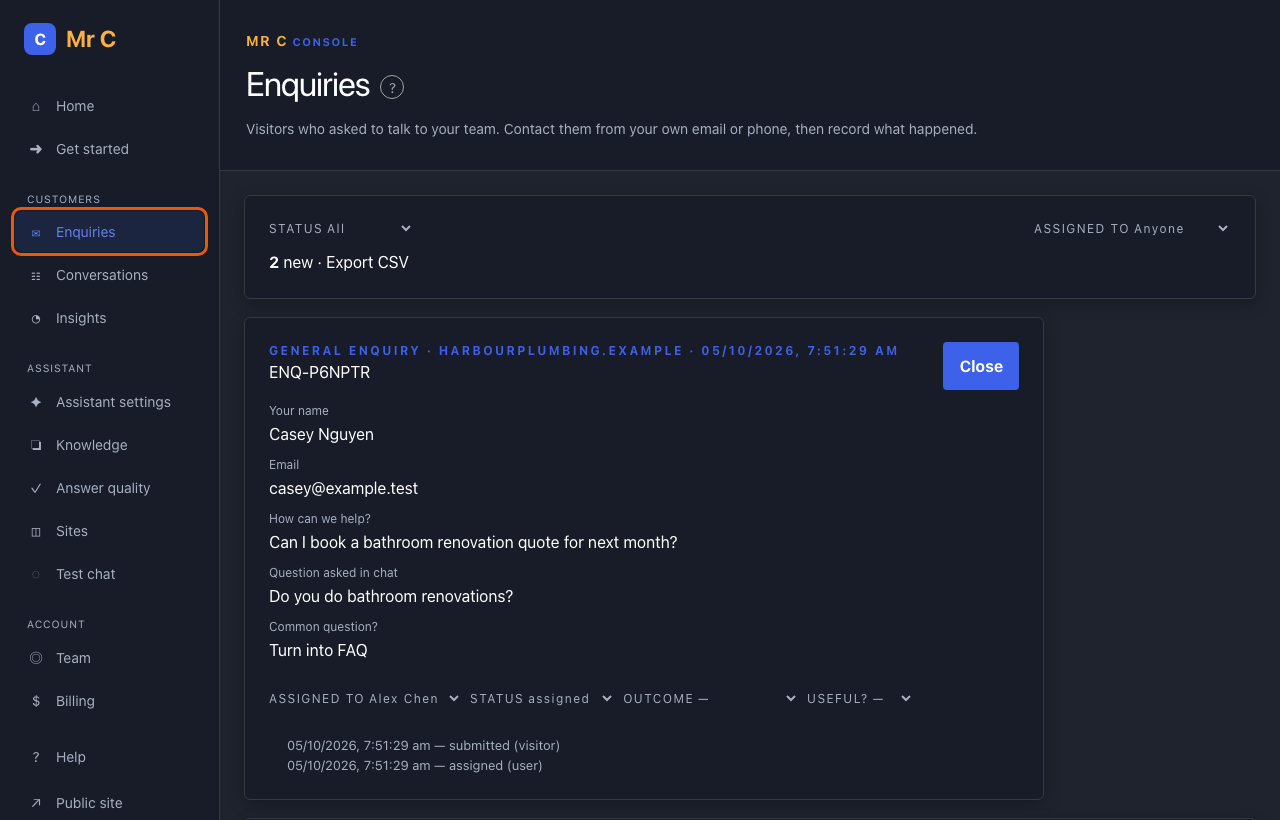
- Select Open on an enquiry to see what the visitor entered and what they asked.
- Select their email address or phone number to contact them from your own email or phone.
- Set Status to contacted.
- When it's finished, choose an Outcome (resolved, won, lost, spam or not relevant). Use Useful? to record whether it was worthwhile.
Share the work
- Use Assigned to in an enquiry to give it to a team member.
- Filter the list by Assigned to → Me or Unassigned.
- If an enquiry is still new 4 business hours after it arrived, the alert addresses get one reminder.
Export
Owners and admins can select Export CSV to download enquiries. Exports are recorded in your audit log, so keep the file safe.
Related
Was this page helpful?