Set up enquiry forms and quote requests
Offer quote, consultation and support forms, with your own field labels.
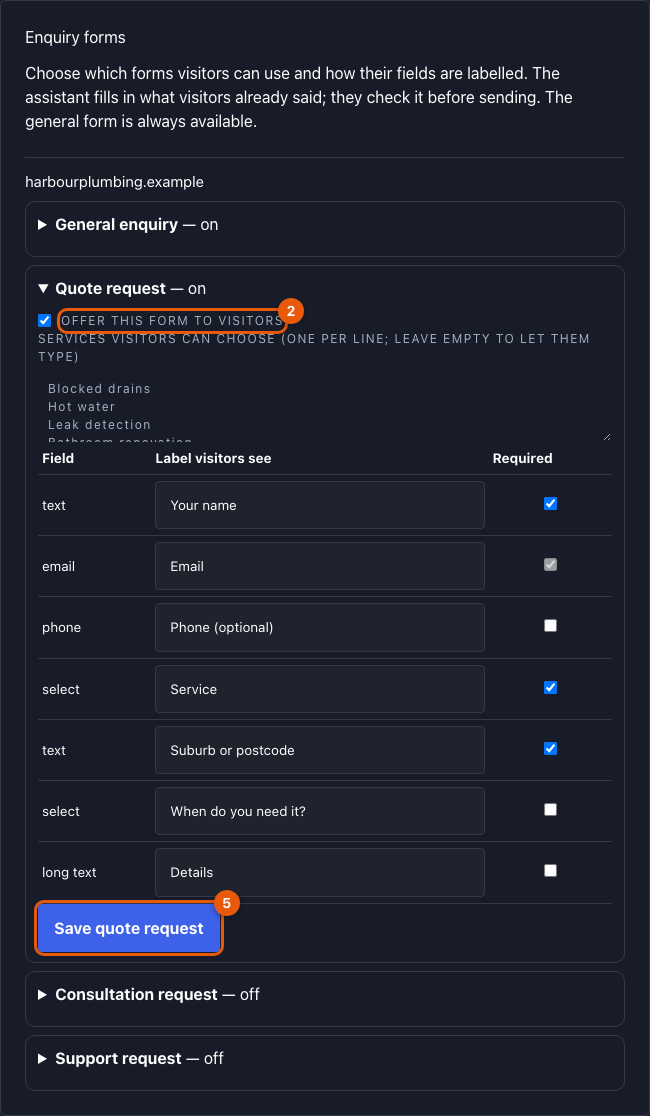
Each website has four forms: General enquiry (always on), Quote request, Consultation request and Support request.
Steps
- Open Console → Enquiries and scroll to Enquiry forms.
- Open a form and tick Offer this form to visitors.
- For quotes, list your services, one per line (or leave it empty to let visitors type).
- Rename fields if you like (for example Suburb or postcode → Where is the job?) and choose which are required. Email always stays required so you can reply.
- Select Save.
What visitors see
In the chat, Talk to the team offers the forms you switched on. The assistant fills in what the visitor already said; they check and correct it before sending. Fields it filled in are marked in the enquiry as pre-filled by the assistant, confirmed by the visitor.
Related
Was this page helpful?