Add your website to the assistant's knowledge
Mr C reads your public pages and answers from them, with links to the page used.
The assistant answers only from content you approve.
Before you start
Your website's domain must be verified on Sites (how).
Steps
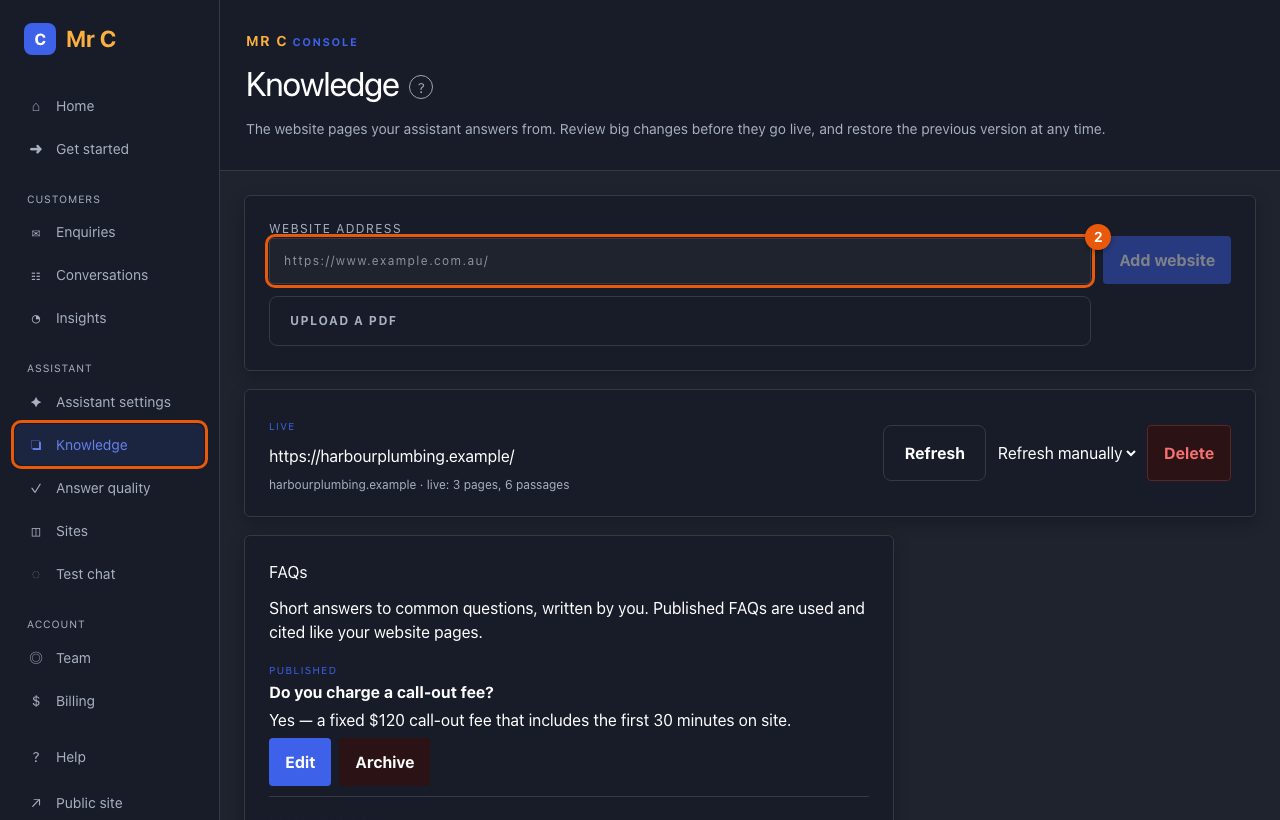
- Open Console → Knowledge.
- Enter your website's address, for example
https://www.yourbusiness.com.au/, and select Add website. The status shows reading…. - After a minute or two the first version goes live automatically.
To use only part of your website, enter the address of that section, for example
https://www.yourbusiness.com.au/services/. Mr C then reads only the pages inside
that folder. Pages listed in your robots.txt as not to be read are always skipped.
Keep it up to date
- Choose Refresh daily or Refresh weekly to have it re-read overnight, or select Refresh after you change your website.
- Small changes go live automatically. If many pages changed, the new version waits as ready for review with a summary of what changed. Select Publish when you're happy.
- Restore previous brings back the version that was live before.
- Delete stops the assistant using the website immediately.
Troubleshooting
| If you see | Do this |
|---|---|
| "Verify this website's domain on the Sites page first." | Verify your website, then add it again. |
| "last update failed" | Your live version is unchanged. Check the site is reachable and try Refresh later. |
| An answer is missing something on your site | Make sure the page is linked from your home page (up to 25 pages, two links deep), then Refresh. Or add an FAQ. |
Related
Was this page helpful?