Verify your website
Prove the website is yours so the assistant can open on it.
The assistant only opens on website addresses you have verified, so nobody can put your assistant (and your conversations) on their own site.
The easiest way: install the snippet and select Check installation. Finding the snippet on your home page verifies that address. Use the steps below for other addresses, or if you prefer DNS or a meta tag.
Steps
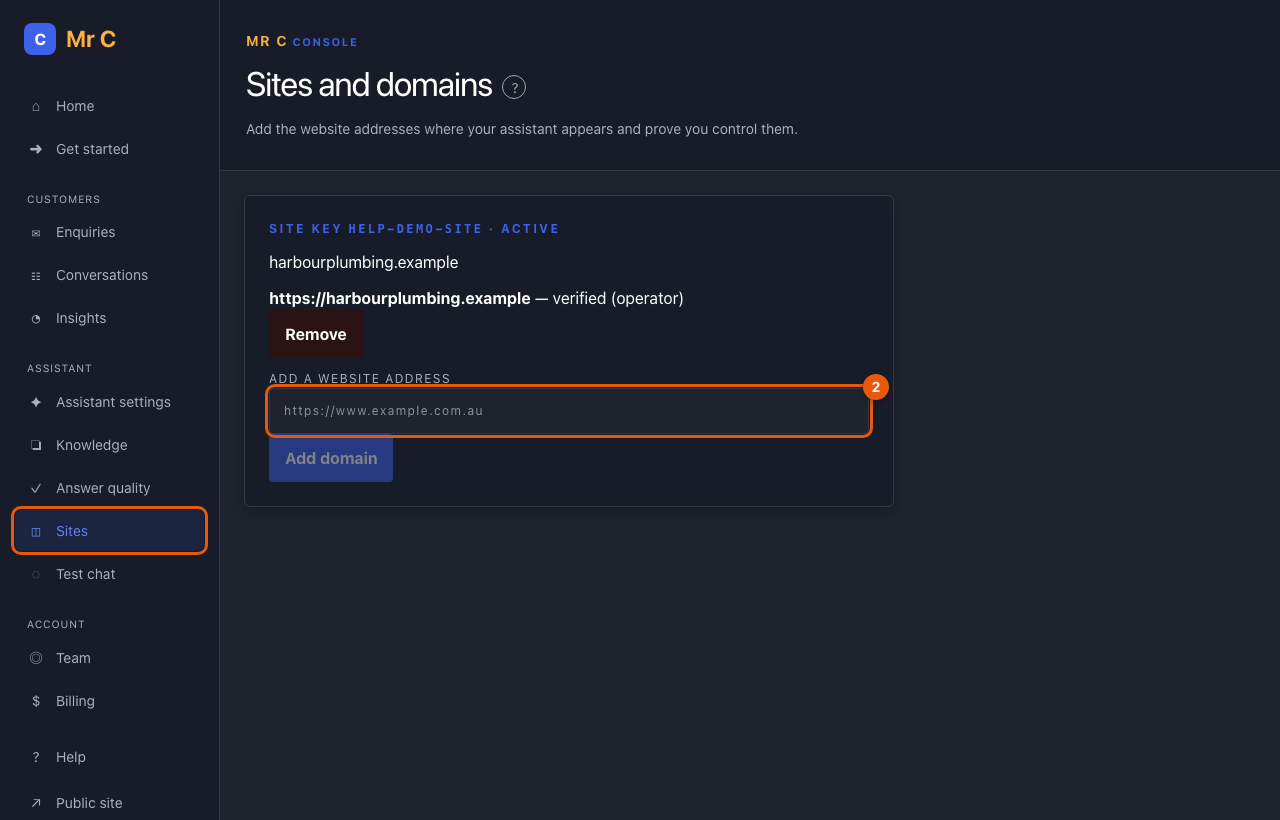
- Open Console → Sites.
- Under your site, enter your website address (for example
https://www.yourbusiness.com.au) and select Add domain. Add each address visitors use separately, with and withoutwww. - Add one of the two items shown:
- a DNS TXT record named
_mrc-verify.<your host>with the value shown, or - the meta tag inside your home page's
<head>.
- a DNS TXT record named
- Select Verify.
What happens next
The address shows verified, and the assistant works there within a minute. Keep the record or tag in place.
Troubleshooting
| If you see | Do this |
|---|---|
| "Not found yet" | DNS changes can take up to an hour. Check the name and value exactly match, then try again. |
| The assistant doesn't appear on a page | The page address must match a verified domain exactly (https, www). |
Related
Was this page helpful?