Plans and billing
Choose a plan, see your usage, update payment details and give notice.
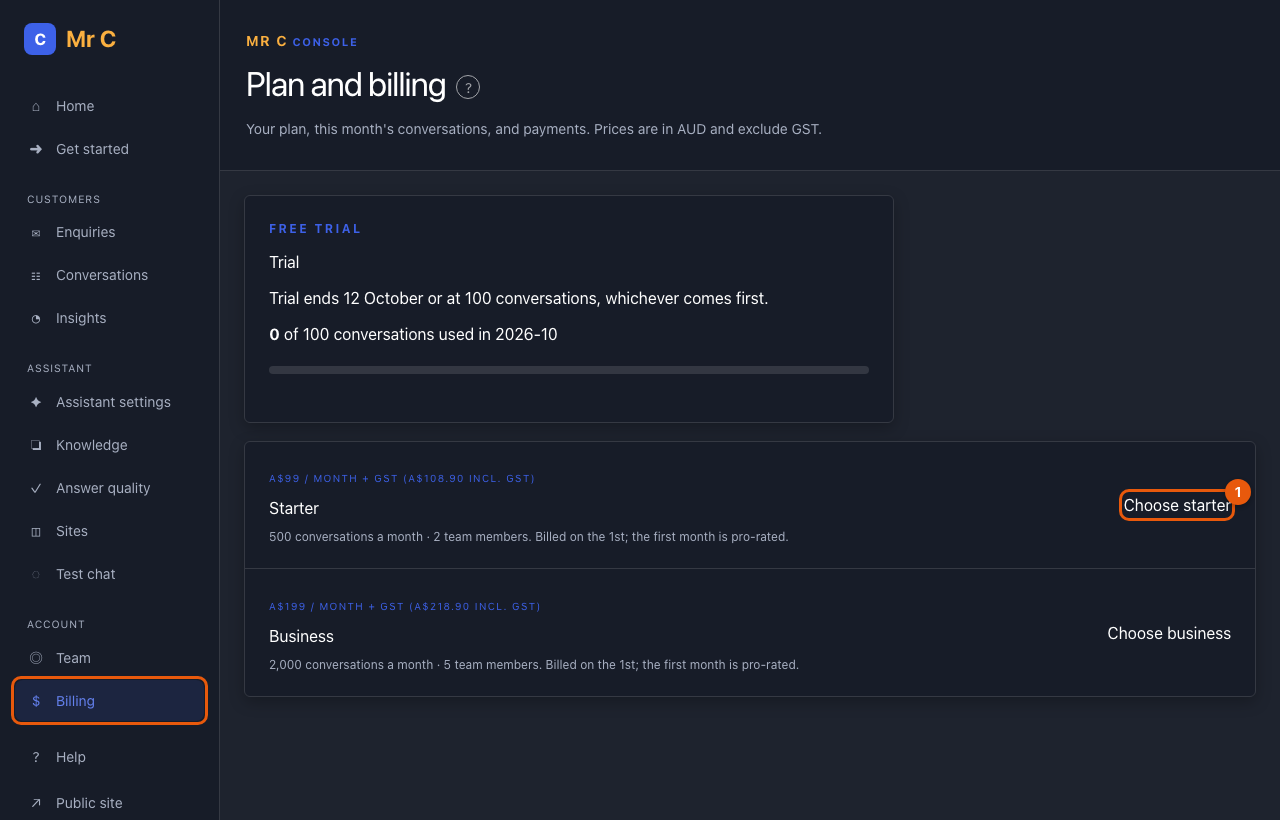
See your plan and usage
Console → Billing shows your plan, its status, and how many conversations you've used this month. A conversation is a visitor chat that gets at least one answer; follow-up questions in the same chat are free.
Choose a plan (owners)
- Select Choose starter or Choose business.
- Pay securely on the Stripe page (card or BECS direct debit).
- The page shows Active as soon as Stripe confirms the payment.
Plans are billed on the 1st of each month, in advance, with 7 days to pay. Your first month is pro-rated. Prices exclude GST; invoices include it.
Payment details and invoices
Select Manage payment and invoices to update your card or bank details and download invoices.
Limits
If you go over your plan's conversations, extra conversations are charged at the plan rate up to a monthly cap, so a bill can never exceed twice the plan price unless you raise it. At the cap, AI answers pause and your enquiry form keeps working.
Give notice
Select Give notice. Your plan continues until the end of next month, then ends. Payments are not refunded except where the law requires.
If a payment fails
Update your payment details straight away. After 14 days overdue, AI answers pause (enquiries keep working) until the invoice is paid.
Related
Was this page helpful?