Quick start: your assistant live in 10 minutes
The five steps from a new account to an assistant answering visitors on your website.
Mr C answers your website visitors from your own content, and when they want a person, it collects a tidy enquiry for your team. This page gets you from a new account to a working assistant.
Before you start
- You need to be the owner or an admin of your organisation.
- Have access to your website's settings to add one line of code, or the email address of whoever looks after your website.
The five steps
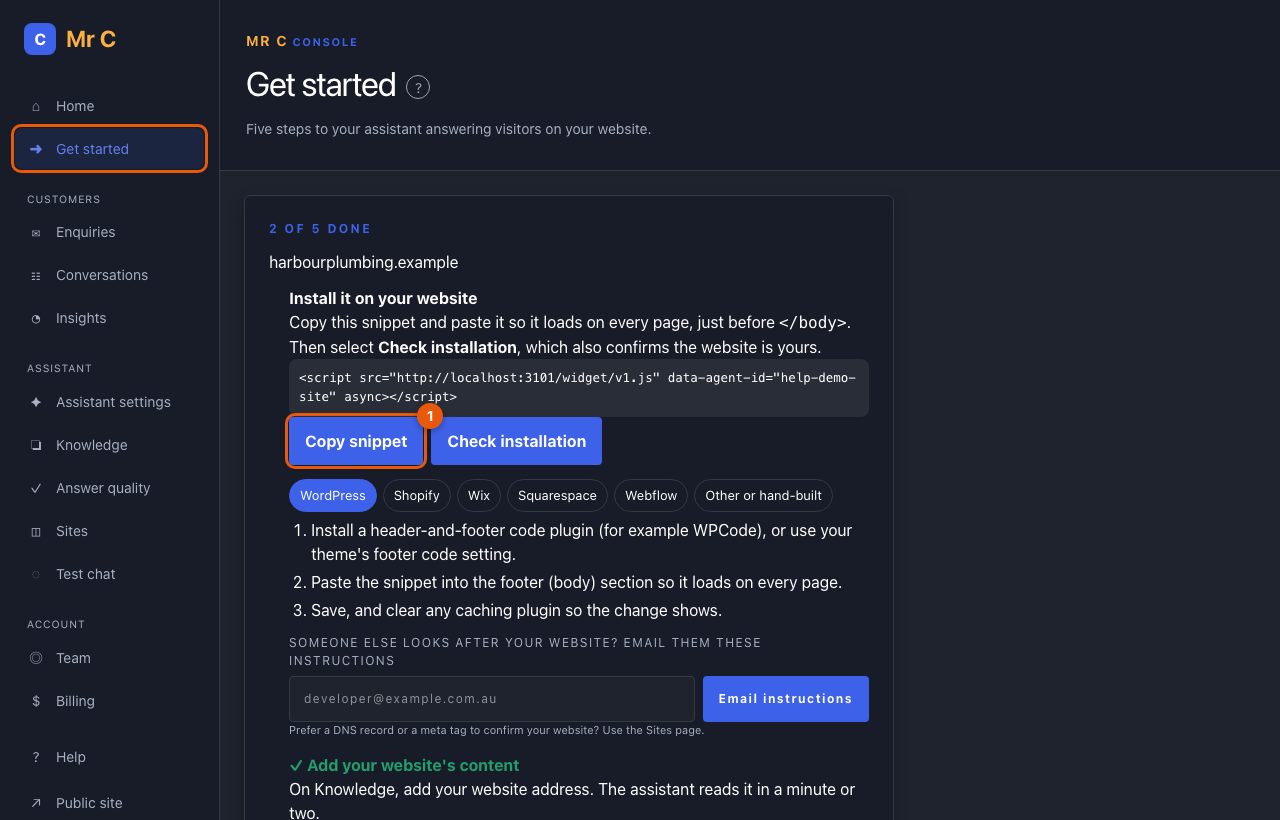
- Install it on your website. On Console → Get started, copy the snippet, choose your platform (WordPress, Shopify, Wix, Squarespace, Webflow) for where to paste it, then select Check installation. Finding the snippet also confirms the website is yours. Someone else looks after your website? Select Email instructions to send them everything they need. Install the widget
- Add your website's content. On Knowledge, enter your website address and select Add website. Mr C reads your pages in a minute or two. Add your website
- Ask it a question. Select the test chat link and ask something your customers often ask, such as your prices or service area.
- Get enquiry alerts. On Enquiries, add the email address that should hear about new enquiries, then confirm it from your inbox. Work the enquiry inbox
- Make it look like your brand. In Assistant settings, upload your logo and choose your colours. Change how it looks
Each step ticks itself off when it's done.
Rather we set it up for you?
At the bottom of Get started, select Request setup help and tell us anything useful, such as your website platform. We'll email you within one business day.
What happens next
Visitors see a small chat button on your website. They get answers from your content with links to the page used, and can select Talk to the team at any time. New enquiries appear in Enquiries and you get an email alert.
Related
Was this page helpful?